Managing Relationships
From the Relationships tab, you are able to manage relationships by:
-
Adding a new relationship.
-
Editing or detailing a relationship.
-
Confirming consent from the Person in Care.
-
Establishing a link between a Caregiver and a Person in Care's medication profile on the BeWell app, if one was not automatically established when the relationship was created.
For more information about managing relationships, use the dropdowns below and watch the videos at the bottom of this page.
For more information about Person in Care consent, see Person in Care Consent.
 Adding a New Relationship
Relationships can only be added from the Person in Care's Relationships tab.
There is a limit of the number of relationships linked on a Patient Folder:
-
A Person in Care can only have 3 active Caregivers.
-
A Person in Care can have an unlimited number of Agents.
-
A Caregiver can have an unlimited number of Patients in Care.
To add a new relationship to a Person in Care's profile:
-
Search for and select the Person in Care profile.
-
On the Main tab of the Patient Folder, select the Relationships tab.
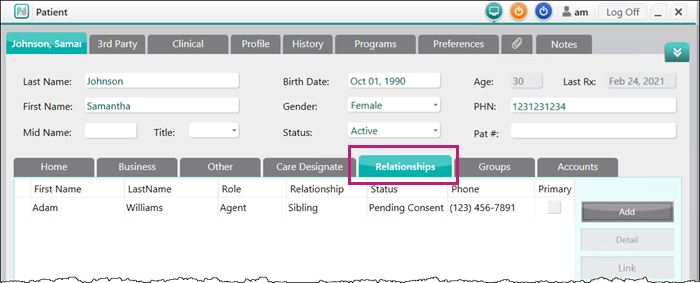
-
Select Add.
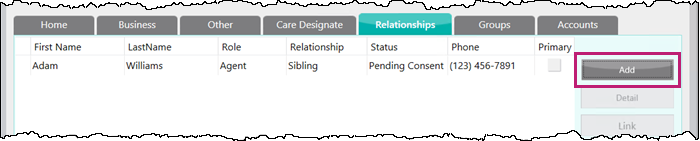
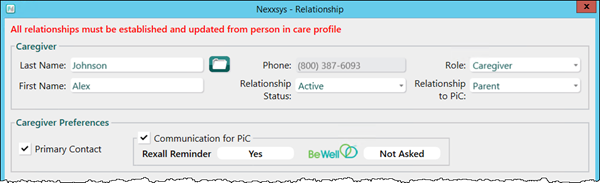
The Relationships window opens.
-
In the Last Name field, enter the last name of the Caregiver or Agent.
-
Select the folder icon
 . The Patient Search window appears with results displayed.
 -
Select the patient that is the Caregiver or Agent.
Note: If the correct patient does not display in the results, a new Patient Folder needs to be created by selecting New. For more information see, Create a New Patient Folder.
-
Select OK. The Patient Search window closes to the Relationships window with the Caregiver or Agent's information populated in the top section.
-
In the top section, use the dropdowns to select the following information:
-
Role
Note: If Agent is selected, the Caregiver Preferences section is removed. Proceed to step 10.
-
Relationship to PiC (Person in Care)

-
-
In the Caregiver Preferences section, confirm the following information:
-
Primary Contact checkbox - select this checkbox if this is the primary Caregiver.
Note: This is selected by default if this is the first Caregiver added to the Person in Care's profile.
-
Communication for PiC - selected and auto-populated by default based on the Caregiver's Rexall Reminders preference and BeWell enrollment set in their profile.
Note: If the Caregiver's Rexall Reminders preference is set to Not Asked or Declined, AND the Caregiver has not enrolled in the BeWell program through Nexxsys, this section is automatically deactivated.
-
-
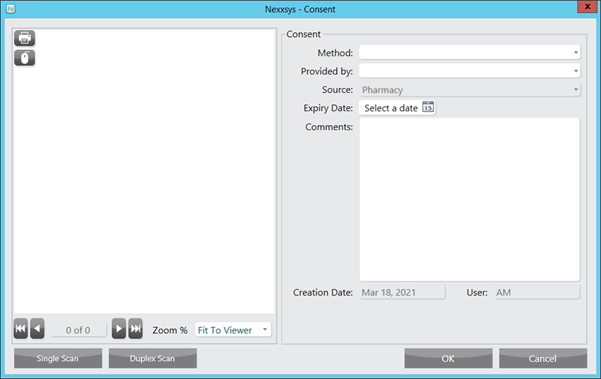
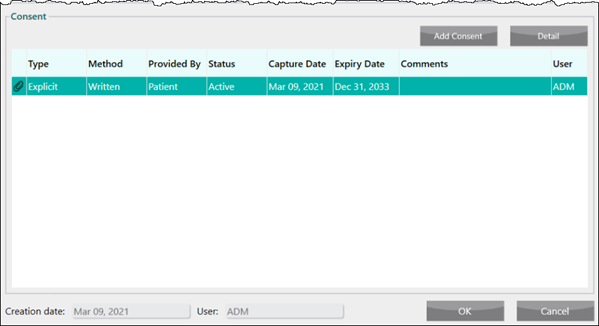
In the Consent section, select Add Consent to add consent.
Note: While it is recommended to gather consent when a relationship is being created, it is not mandatory. Consent can be gathered after a relationship has been created but Caregiver's cannot manage prescriptions or receive notifications on behalf of the Person in Care until consent is provided.
If not gathering consent until a later time, proceed to step 14.The Consent window opens.
-
Enter the following information:
-
Method
-
Provided by
-
Optional - Expiry Date
Note: If the Person in Care is younger than 14 years old, the Expiry Date field is automatically populated to one day prior to the Person in Care's 14th birthday. Once the Person in Care is 14 years old, consent needs to be renewed.
-
-
Select Single Scan or Duplex Scan to attach the consent form.
-
Select OK. The Consent window closes to the Relationships window and a new line has been added.
-
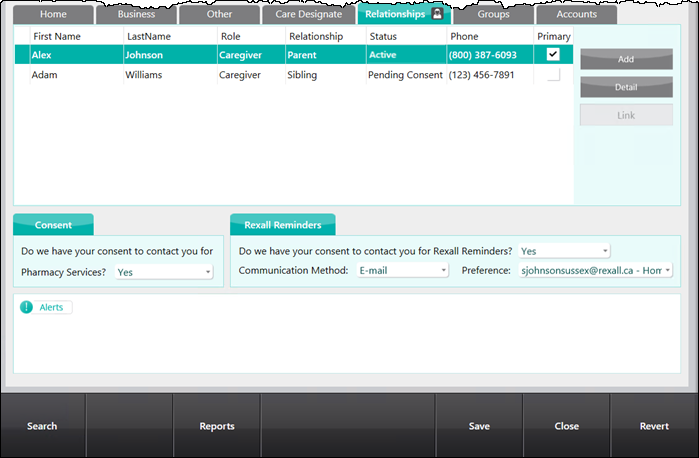
Select OK. The relationship is added to the Relationships tab.
Primary Checkbox
If the new relationship added is for the Primary Caregiver, the Caregiver will have the Primary checkbox selected and their row will appear in bold. This signifies if there is a question related to the Person in Care's prescription, this Caregiver should be contacted.
If a different Caregiver needs to be the Primary Caregiver, this can be changed by Editing or Detailing a Relationship.

Note: Regardless of which Caregiver is selected as the Primary Caregiver, all active Cargiver's are able to manage prescriptions and receive notifications on behalf of the Person in Care.
Consent Status
Depending on if consent was provided or not, the Status field will display one of the following:
-
Active - if consent was gathered at the time of creating the relationship.

-
Pending Consent - consent was not provided at the time of creating the relationship and must be added to the relationship. The Caregiver will not be able to manage medications or receive notification on behalf of the Person in Care.

Editing or Detailing a Relationship
Relationships can be detailed from either the Caregiver's, Agent's or Person in Care's Patient Folder.
Relationships can only be edited from a Person in Care's Patient Folder.
To edit or detail a relationship, select the Detail button in the Relationships tab.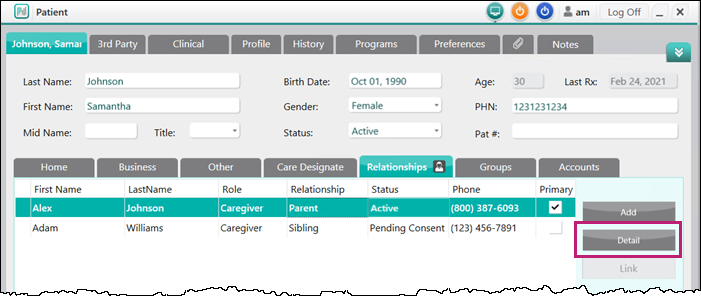
The Relationships window opens with the information about the relationship.
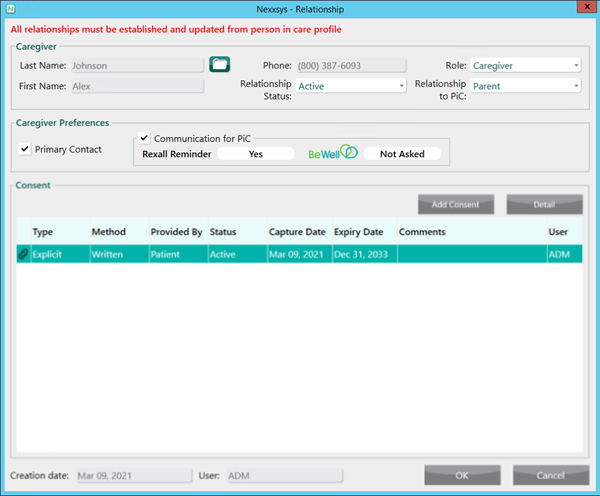
If editing the relationship from the Person in Care's profile, the following information can be edited:
-
Role
-
Relationship Status
-
Primary Contact checkbox
-
Communications for PiC (Person in Care) checkbox
Linking a Person in Care to a Caregiver's BeWell Account
Nexxsys will automatically send a message to the BeWell app to allow the Caregiver to manage prescriptions and receive notifications on behalf of a Person in Care when:
-
The Caregiver has a BeWell app registered to their Patient Folder in Nexxsys
-
Consent has been approved by the Person in Care.
However, if a Caregiver is unable to view the Person in Care's medication, you can resend a notification to the BeWell app to link the profiles.
To resend a notification to the BeWell app:
-
Search for and select the Caregiver's Patient Folder.
-
From the Main tab, select the Relationships tab.
-
Highlight the Person in Care's relationship and select Link.
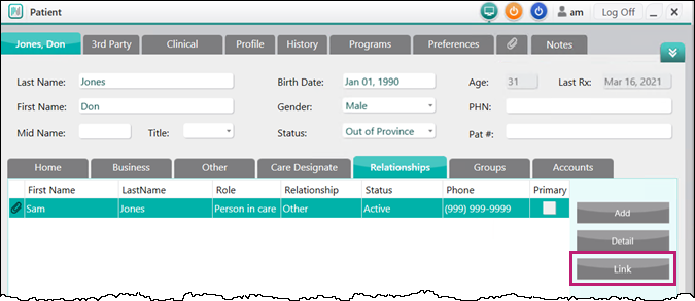
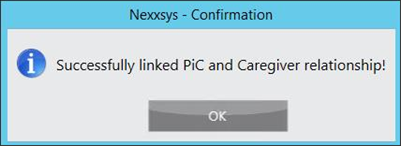
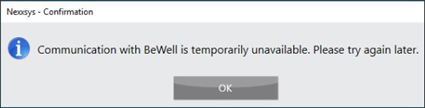
Once a link is established, one of the following prompts displays:
-
Linking was successful
-
Linking was not successful
Setting up a Caregiver Relationship in Be Well™ for a Person in Care